Rep counting gets all the attention. So does calorie tracking, streak counters, avatar customization, all the stuff that shows up in the app store screenshots. Meanwhile there’s a feature sitting in nearly every major AR fitness platform that almost nobody touches, and it’s arguably more useful than half the flashy stuff surrounding it: post-session movement replay.
Most people don’t even know it’s there.
1. What Movement Replay Actually Is
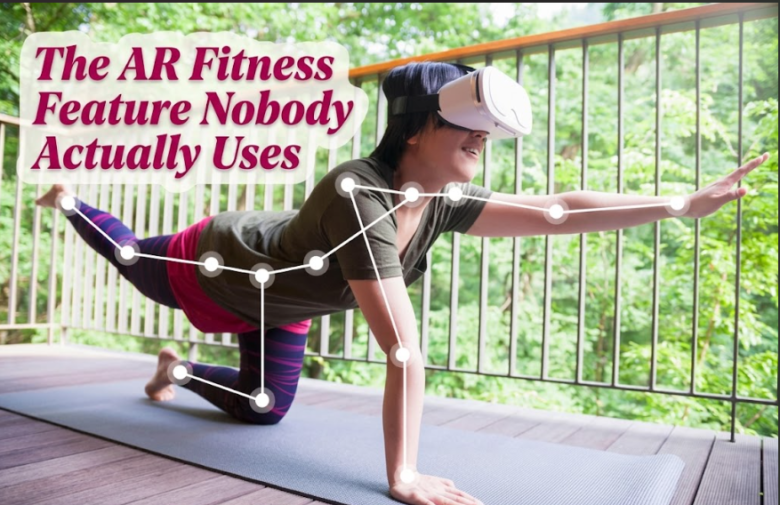
Movement replay lets you watch your own session back after it’s over, usually as a skeleton overlay or a slowed-down avatar reconstruction of what your body actually did during the workout. It’s not the same as a highlight reel or a score summary. It’s closer to game tape, the kind a coach would review with an athlete, except it’s sitting quietly in a menu most users never open.
The reason it exists is straightforward. The same skeletal tracking data used to score your movements in real time gets recorded and can be replayed frame by frame. Building the replay feature costs the developer very little once the tracking system already exists. Getting users to actually open it is the harder problem, and most platforms haven’t solved that part.
2. Why Nobody Uses It
Here’s where people usually go wrong, or more accurately, where they never even get the chance to go right. The feature is usually buried two or three menus deep, labeled something forgettable like “session history” or “movement log,” and it’s never surfaced immediately after a workout when curiosity would actually be highest.
Compare that to the calorie summary screen, which appears the second you finish a session, front and center, colorful, easy to screenshot. Replay data requires you to go looking for it. Most users finish a workout, glance at the score, and move on with their day.
There’s also a comfort issue. Watching a skeleton reconstruction of your own movement can feel oddly clinical or even a little uncomfortable the first time, in a way a calorie number never does. That’s probably part of why engagement with this feature stays so low across most platforms, even ones with genuinely good replay tools.
3. What You Actually Learn From Watching It Back
This is the part worth pushing past the discomfort for. Replay reveals things live feedback during the workout simply can’t catch, because you’re too busy moving to notice your own form breaking down.
A few examples that come up constantly once people start reviewing their sessions:
- Shoulder height drifting lower over the course of a boxing combo as fatigue sets in, something the real-time scoring often doesn’t penalize heavily enough to notice mid-session
- Knee tracking inward slightly during squat-based movements, a pattern that’s nearly invisible without an outside view
- Asymmetry between left and right side power, one arm or leg consistently moving with more range or speed than the other
- Rushing through the eccentric portion of a movement to keep pace with the game’s rhythm, which undercuts the strength benefit of that phase
None of this shows up clearly in a live score or a calorie count. It only becomes obvious watching the movement from outside your own body, which is exactly what replay lets you do.
Ar Body Health Online has written before about how AR workouts track your form live, and replay is really the other half of that same system, the part that happens after the session instead of during it.
4. How to Actually Use This Feature Well
Once a week is enough. You don’t need to review every session, that turns a useful habit into a chore fast. Pick your hardest or most technical session of the week, boxing, HIIT circuits, anything with fast compound movement, and watch the replay at reduced speed if the app allows it.
Focus on one thing per review, not everything at once. Shoulder position this week. Knee tracking next week. Trying to critique your entire form in one replay session usually just leads to nothing sticking.
| Review Focus | What to Watch For | Frequency |
|---|---|---|
| Upper body posture | Shoulder height and rounding during fatigue | Weekly, on hardest session |
| Lower body alignment | Knee tracking during jumps or squats | Weekly, rotate with upper body |
| Left-right symmetry | Power and range differences between sides | Every two weeks |
| Movement tempo | Rushed eccentric phases under game pace pressure | Monthly |
And be honest with yourself watching it back. It’s easy to see something off in the replay and immediately explain it away as a bad angle or a one-off. Sometimes that’s true. But if the same pattern shows up three sessions in a row, it’s not the angle.
Where This Actually Matters Long Term
Small form breakdowns compound over months of training, especially in gamified formats where the fun factor can mask the fact that fatigue is quietly changing how you move. A rep counter doesn’t catch that. A replay does, if you actually watch it.
I’d stop short of saying every AR fitness user needs to become obsessive about frame-by-frame review. Most people are fine without it. But if you’ve hit a plateau, or something feels slightly off during workouts without an obvious cause, the replay feature buried in your app’s menu is worth the two minutes it takes to find.
Ar Body Health Online’s roundup on signs your wearable might be reading you wrong pairs well with this topic too, since sensor misreads and form breakdown often get confused for one another when something feels off mid-session.
FAQs
Which AR fitness platforms actually have a movement replay feature? Most major platforms with skeletal tracking include some version of it, though the depth varies. Some offer full frame-by-frame playback while others only show a simplified summary animation, so it’s worth checking your specific app’s settings or history menu.
Do I need special equipment to use replay effectively? No, it works with whatever camera or sensor setup your AR fitness system already uses for live tracking. The replay draws from the same data collected during the session itself.
How is this different from just watching myself on video? Skeletal replay isolates your joint movement and posture without the visual noise of background, lighting, or clothing, which makes specific form issues like knee tracking or shoulder drift easier to spot than a regular video would.
Is it worth reviewing every single workout? Not really. Reviewing your most demanding session once a week is usually enough to catch developing patterns without turning the habit into a chore that gets abandoned after two weeks.
Can replay data actually prevent injury? It can help catch developing form breakdowns before they become painful, particularly asymmetries or joint tracking issues that build up gradually, though it’s not a substitute for addressing pain if it’s already present.
Ar Body Health Online keeps a running list of underused wearable and AR fitness features worth trying at how arbodyhealth picks the best wearables.