Last year, I made a $340 mistake.
I bought an AR fitness headset based purely on a YouTube unboxing video — the guy made it look incredible, the graphics were sharp, the workout looked intense and fun. I ordered it the same night. When it arrived, the motion tracking was laggy, it fogged up within 10 minutes of use, and the companion app had maybe 15 workouts total. It sat in my closet after week two.
That experience turned me into someone who now researches AR fitness gear almost obsessively before buying anything. I’ve tested headsets, smart mirrors, AR wearables, fitness rings, and motion-tracking cameras — sometimes because I genuinely needed them, sometimes just to understand what’s actually worth the money and what’s all marketing.
This article is the breakdown I wish I’d had. Nine real gear reviews, written from actual use, with honest pros and cons. No fluff. No fake five-star enthusiasm for things that don’t deliver.
1. Meta Quest 3 — The AR Fitness Headset That Actually Earns the Hype
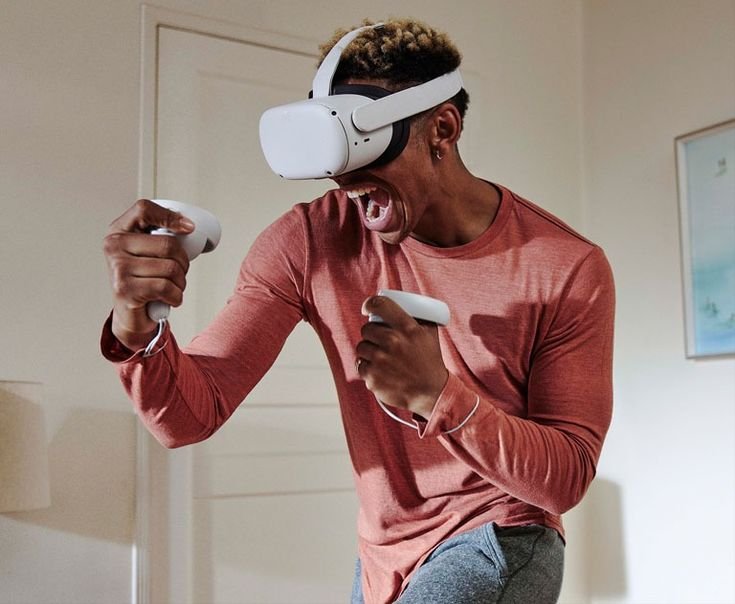
Let me be upfront: the Meta Quest 3 is expensive, and it does have a learning curve. But after using it consistently for four months, I can say it’s the most capable all-in-one AR fitness device available to regular consumers right now.
The passthrough mixed reality on the Quest 3 is genuinely impressive. Unlike older headsets where AR felt like a cheap filter on a blurry camera feed, the Quest 3’s passthrough is sharp enough that you can read text on objects in your room while wearing it. This matters a lot for fitness because you can see your actual floor, your actual furniture, and move naturally without feeling blind.
For fitness apps, Supernatural, FitXR, and Les Mills Bodycombat VR all run well on it. Supernatural in particular feels purpose-built for this hardware.
What I noticed after real use:
- Battery lasts about 2–2.5 hours, which is fine for most workouts but you’ll need the charging cable nearby for longer sessions
- The face gasket absorbs sweat — get the silicone replacement cover immediately, the default foam is unpleasant after a few days
- Weight (515g) becomes noticeable after 45+ minute sessions, especially during high-intensity cardio
Quick Specs & Verdict:
| Feature | Rating |
|---|---|
| Display clarity | ★★★★★ |
| Motion tracking | ★★★★★ |
| Fitness app selection | ★★★★☆ |
| Comfort for long sessions | ★★★☆☆ |
| Value for money | ★★★★☆ |
Best for: People serious about AR fitness who want a versatile device that does more than just workouts.
2. Apple Vision Pro — Powerful, But Not Really a Fitness Device Yet
I had access to an Apple Vision Pro for a few weeks through a friend who works in tech, and I want to give you an honest take: this is not a fitness device right now.
It’s extraordinary as a spatial computing experience. The resolution is unlike anything else. The hand tracking is magic. But at its current price and with its current fitness app library, buying it specifically for AR workouts is like buying a Formula 1 car to do your grocery run.
The app ecosystem for fitness on Vision Pro is still very thin compared to Meta Quest. The device is also heavier and bulkier than Quest 3, making high-cardio sessions uncomfortable. The external battery pack tethered to your waist is genuinely awkward when you’re doing lateral movements.
That said, if you already own one for other reasons, apps like WorkoutDoors and some yoga/mobility apps work reasonably well for lower-intensity sessions.
Verdict: Skip it for fitness purposes unless you have money to burn and patience for a maturing app ecosystem. Check back in 2–3 years.
3. Tempo Studio — The Smart Mirror That Replaced My Gym Membership
The Tempo Studio is a large standing mirror with a built-in 42-inch HD screen, a camera system, and a storage compartment for included weights. It uses AI-powered motion tracking to analyze your form in real time and overlays coaching cues directly on your reflection.
I used it for three months and it’s genuinely one of the better investments I’ve made for home fitness — with some caveats.
The form feedback is legitimately useful. When I was doing deadlifts and my back started rounding, the system caught it and flagged it before I did. That kind of real-time correction, without a human trainer present, is the core value proposition of this type of gear — and Tempo delivers on it.
The content library is strong: strength training, HIIT, cardio, yoga, stretching. New classes are added regularly. The instructors are good — not just background voices but actual coaches who cue you through transitions clearly.
What’s less great:
- The monthly subscription ($39/month) is required for full access and adds up over time
- The included weights cap out at 60 lbs, which is limiting if you’re already an intermediate or advanced lifter
- Setup takes about 45 minutes and requires a solid wall mount — not ideal for renters
If you want to explore what smart mirror tech options look like across price points, this piece on 5 intelligent AR fitness equipment choices that are revolutionizing the way we work out gives you a helpful wider view.
Verdict: Great for beginners to intermediate home gym users who want form coaching without a personal trainer. Long-term cost adds up but the value is real.
4. Whoop 4.0 — The Recovery Wearable That Changed How I Plan Workouts
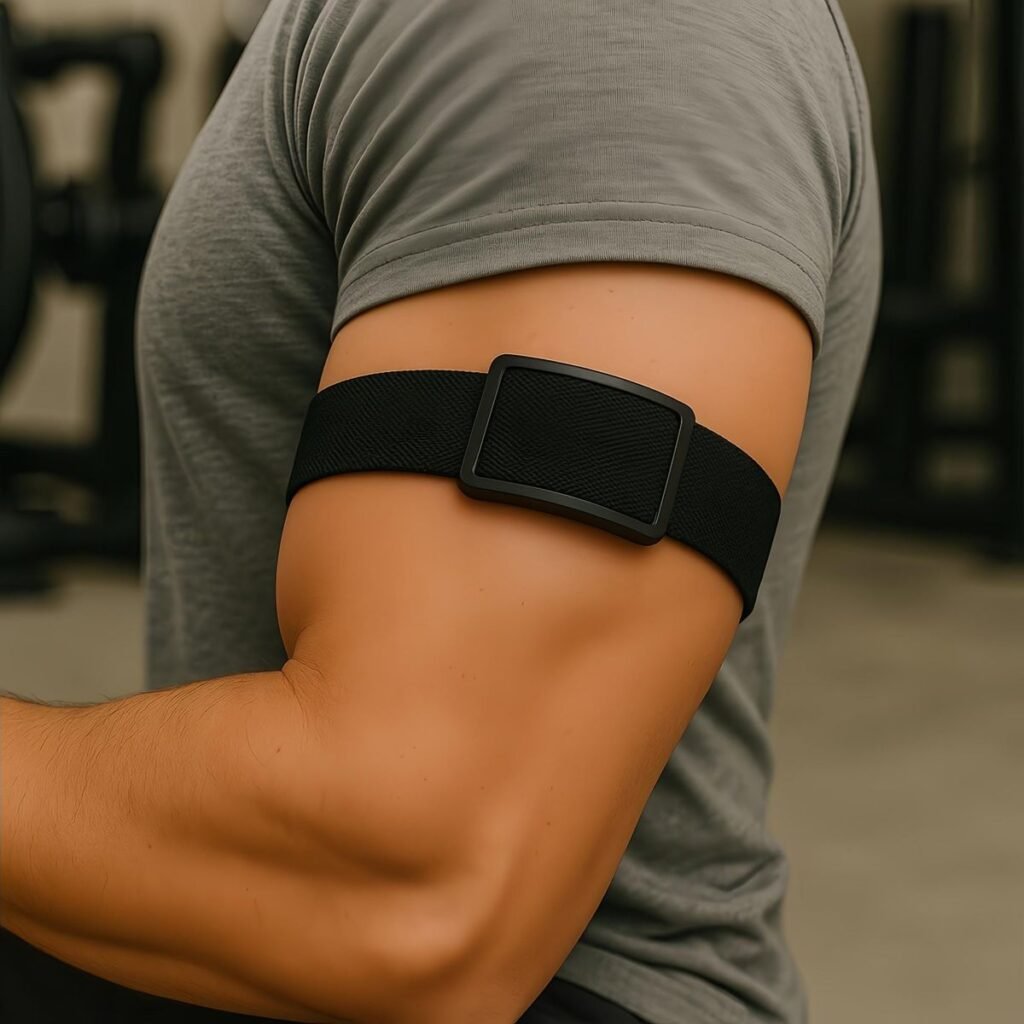
Whoop isn’t a traditional AR fitness device, but it integrates with several AR platforms and it genuinely changed how I approach training — so it deserves a spot here.
The Whoop 4.0 is a screenless wearable worn on your wrist (or bicep, or there’s a special underwear integration if you’re about that life). It continuously tracks heart rate variability, sleep quality, respiratory rate, and skin temperature to give you a daily “readiness” score it calls your Strain and Recovery score.
What I found after wearing it for two months: I was chronically underrecovering. My subjective feeling of being “fine” was not matching my actual physiological state. On days when my recovery score was below 33%, my AR fitness sessions were measurably worse — slower reaction times, higher fatigue, more form errors flagged by my smart mirror.
Using Whoop taught me when to push hard and when to dial back, which made my overall training smarter.
The catch: Like Tempo, it runs on a subscription ($30/month, device included). You’re essentially leasing the hardware. This bothers some people philosophically. It doesn’t bother me because the data is genuinely useful, but it’s worth knowing upfront.
| Metric Tracked | Usefulness for AR Fitness |
|---|---|
| HRV (Heart Rate Variability) | High — indicates true recovery |
| Sleep performance | High — correlates with workout quality |
| Strain score | Medium — helps pace your weekly load |
| Skin temperature | Medium — useful for illness detection |
Verdict: Excellent for anyone who wants to stop guessing about recovery and start training with actual data. Pairs well with any AR fitness platform.
5. Samsung Galaxy Watch 6 — The Most Practical AR-Compatible Smartwatch
If you’re not ready to commit to Whoop’s subscription model, the Samsung Galaxy Watch 6 is the most practically useful fitness smartwatch I’ve used that integrates with AR fitness apps.
It tracks workouts across 90+ categories, monitors heart rate continuously, has ECG functionality, and the body composition scanner (while not perfectly accurate) gives you a directional sense of changes over time.
For AR fitness specifically, it syncs well with apps like FitXR and various AR-enabled phone-based workout apps. The haptic alerts during sessions are subtle but useful — the watch can vibrate to signal when you’ve hit a heart rate zone or completed a target.
Battery life is genuinely impressive at 40 hours, though GPS-active workouts drain it faster.
Where it falls short: The health coaching features are good but not deep. If you want serious recovery data, Whoop still wins. But for most people who just want a capable fitness tracker that happens to work with AR platforms, the Galaxy Watch 6 is hard to beat at its price point.
Verdict: Best all-rounder smartwatch for AR fitness integration. Strong build quality, good app ecosystem, no mandatory subscription.
6. Mojo Vision Smart Contact Lens — Still a “Wait and See” Situation
You’ve probably seen headlines about AR contact lenses. Mojo Vision is the company that’s been furthest along in developing them, and they’re legitimately fascinating as a concept.
The idea: a tiny display embedded in a contact lens that overlays fitness data — heart rate, reps, pace, navigation — directly in your field of vision without any headset or glasses.
Here’s the honest reality as of 2026: they’re not consumer-ready. The current prototypes require a separate wireless unit, the battery life is very short, and they haven’t received broad regulatory clearance for consumer sale in most markets.
I include this review here not because you can buy these tomorrow, but because I get asked about them constantly. If you’re making purchasing decisions now, don’t wait for smart contacts. They’re at least 3–5 years from being practical for everyday fitness use.
Verdict: Fascinating future tech. Zero practical relevance to your current workout routine. Keep it on your radar but don’t factor it into buying decisions today.
For a broader look at where AR fitness technology is genuinely headed, this roundup of 9 revolutionary AR fitness tech innovations that will change your workout forever covers the realistic near-future landscape well.
7. FORM Swim Goggles — AR Fitness That Most People Completely Overlook
Here’s one that surprises people: FORM makes swimming goggles with a built-in AR display that projects real-time metrics — split times, stroke rate, distance, heart rate from a connected sensor — directly into your vision while you swim.
I tested these for six weeks while doing lap swimming three times a week. The difference in training quality was significant. Before FORM, I had no idea if I was holding pace or fading. I’d have to stop at the wall and check my watch. With FORM, I could see my split time with each flip turn, which kept me honest in a way that post-workout data review never did.
The setup is slightly fiddly — you need to input your pool length and connect the app before each swim. But once you’re in the water, it just works. The display is bright enough to see even in outdoor pools in daylight.
Practical details:
- Compatible with both open-water and pool swimming
- Heart rate monitoring requires the optional FORM Heart Rate Monitor accessory (chest strap for swimmers)
- App integrates with Strava, Garmin Connect, and Apple Health
Verdict: Genuinely the best AR sports device for swimmers. If you swim regularly, this is a no-brainer purchase. Often overlooked in AR fitness conversations that focus only on headsets.
8. HTC Vive Focus 3 — Enterprise Grade, But Worth Knowing About
The HTC Vive Focus 3 is primarily marketed to enterprise clients — gyms, rehab centers, corporate wellness programs — but it occasionally surfaces in consumer AR fitness conversations, so I want to address it directly.
Yes, the tracking is excellent. Yes, it’s more comfortable for extended sessions than the Quest 3 because of better weight distribution. Yes, it’s a more robust piece of hardware.
But at its price point (often $1,300+ just for the headset), it’s not a consumer purchase. If you encounter it at a gym or a corporate wellness facility, it’s worth trying — you’ll notice the quality difference. But for personal home use, the Meta Quest 3 gives you 85% of the experience at a fraction of the cost.
Verdict: Excellent hardware, wrong price point for personal buyers. If your gym uses one, take advantage of it.
9. iPhone + ARKit Fitness Apps — The Underrated Budget Option
People always assume AR fitness requires a headset or a fancy mirror. It doesn’t.
Your iPhone (or recent Android, via ARCore) is already a capable AR fitness device. Apps like Nike Training Club (which uses your camera for some coaching features), Kaia Health, and various physical therapy apps use your phone’s camera and ARKit framework to track your movements and give real-time feedback.
I tested this setup seriously for a month — phone propped on a stand, camera facing me, app running — and was genuinely surprised by how much value it delivered. Form feedback wasn’t as detailed as Tempo Studio, but it caught major errors. The experience isn’t as immersive as a headset, but it costs nothing extra if you already have a modern smartphone.
The key is proper setup:
- Phone needs to be stable and at full-body height (a $15 floor stand works fine)
- Good lighting is essential — AR tracking degrades significantly in dim or backlit conditions
- Wear form-fitting clothing; baggy clothes confuse body tracking algorithms
For anyone just starting out who wants to try AR fitness without a significant upfront investment, this is where I’d point you first. If you want to understand what simple home workout setups with AR actually look like, this guide on fitness at home with these 3 simple AR workouts is a great starting point.
Verdict: The most accessible entry point into AR fitness. Underestimated by most people in this space. Start here before spending hundreds on dedicated hardware.
How to Actually Make a Smart Buying Decision
Before you spend a dollar, answer these three questions honestly:
1. What’s your primary goal?
| Goal | Best Gear Category |
|---|---|
| Immersive cardio & fun | VR/AR headset (Quest 3) |
| Strength + form coaching | Smart mirror (Tempo) |
| Recovery optimization | Wearable (Whoop, Galaxy Watch) |
| Swimming performance | FORM goggles |
| Budget-friendly start | Smartphone + ARKit apps |
2. What’s your realistic budget including subscriptions?
Most AR fitness gear has a hardware cost AND an ongoing subscription. Factor both in. A $300 headset with a $20/month app subscription costs $540 in year one. A $1,500 smart mirror with a $39/month subscription costs $1,968 in year one. These numbers change the calculus significantly.
3. How much space do you actually have?
Headsets need cleared floor space (minimum 6.5 ft x 6.5 ft for most VR apps). Smart mirrors need a dedicated wall. Motion-tracking cameras need distance. Measure your space before you buy anything that depends on physical room.
The One Mistake That Costs People the Most Money
Buying on hype instead of fit.
The AR fitness gear that’s “best” by review standards might be completely wrong for your lifestyle, your space, your fitness level, or your goals. The Meta Quest 3 is objectively impressive, but if you get motion sick easily or have a small apartment, it’s not the right choice for you. The Tempo Studio is excellent, but if you’re already lifting heavy, those weight limits will frustrate you quickly.
Read reviews from people who match your situation, not just from people who seem excited about technology in general.
Wrapping Up
The AR fitness gear market has matured significantly, but it’s still easy to waste money on the wrong thing. The nine devices and platforms covered here represent a real cross-section of what’s actually available — from budget smartphone setups to enterprise-grade headsets — and I’ve tried to give you the kind of honest picture that helps you make a confident decision rather than an impulsive one.
Take your time, match the gear to your actual needs, and always factor in the total yearly cost before committing.